In Hotmail
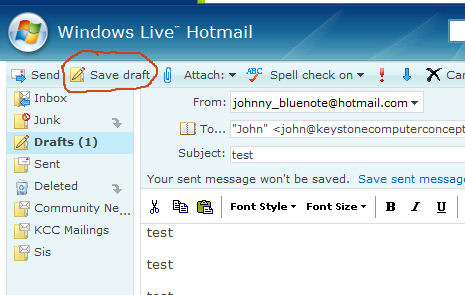
Hotmail will save an email you are composing into the DRAFT folder if you save as you go along. To save an email you are composing, click on the button SAVE DRAFT. Here's a picture of where you'll find it.
You can click the SAVE DRAFT button as often as you want while you're composing your new email. Hotmail will continually update the saved draft as you do. When you have finished your email and sent it, Hotmail will remove the backup copy from the Draft Folder.
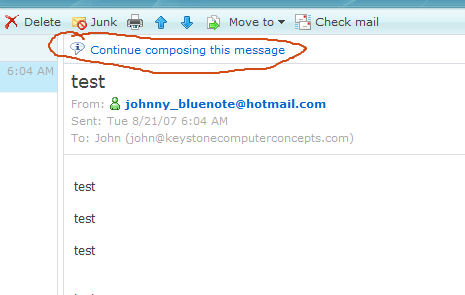
Okay, let's say you save your email as you're composing it. Suddenly, it disappears! What do you do now? This is the easy part! Just click on your DRAFT folder and the email you've composed will be there - up to the point of your last save. Select the email and it will appear on the right. When it does, you'll see CONTINUE COMPOSING THIS EMAIL. Click on that, and you're right back to writing your email.
If you save often enough, you will lose very little and you won't be tempted to throw your computer to the street! Try it, you'll like it.